Why a 10-Person U.S. Business Needs an AI Operating System in 2026
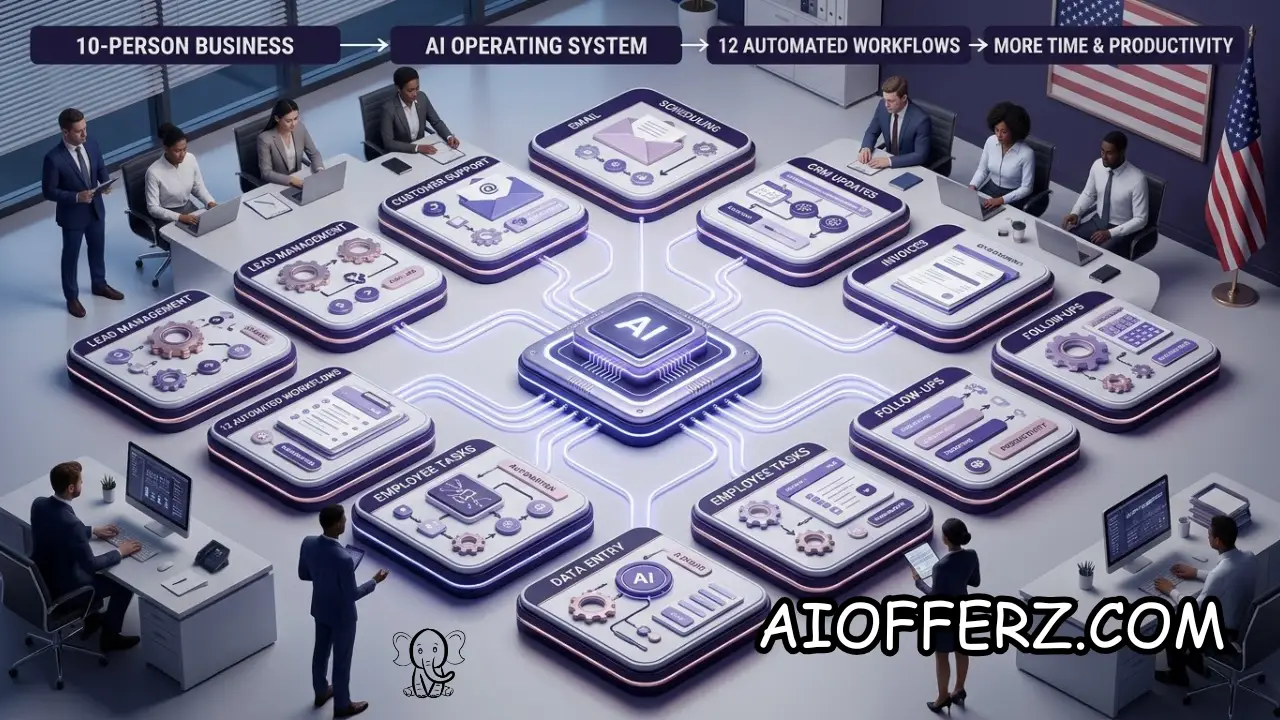
A 10-person business does not have the budget or staffing depth of a large corporation, but it still handles many of the same basic operational tasks.
Employees answer customer questions, prepare proposals, schedule meetings, process invoices, follow up with leads, create documents, manage projects, and communicate internally.
The difference is that a small team has fewer people available to absorb repetitive work.
This is why the idea of an AI operating system for a small business is becoming more practical in 2026. It does not necessarily mean buying one giant AI platform.
Instead, it means connecting AI-assisted workflows so information can move through the company with less manual effort.
Current U.S. data shows that small businesses are increasingly experimenting with AI. The San Francisco Fed reported in 2026 that nearly 40% of small-business respondents to the 2024 Small Business Credit Survey were already using AI or planning to use it soon.
Common applications included productivity, marketing, written communications, customer service, analytics, and forecasting.
The U.S. Census Bureau’s Business Trends and Outlook Survey also shows that AI adoption varies substantially by company size.
During its December 2025 to May 2026 observation period, overall business AI use was around 17% to 20%, while firms with fewer than five employees had much lower adoption than larger firms.
For a 10-person company, the objective should not be to automate employees out of the business. The more realistic goal is to give every employee better leverage.
A salesperson can spend less time updating records, an office manager can spend less time chasing paperwork, and an owner can spend less time answering routine internal questions.
That is also why workflow selection matters more than the number of AI tools a company owns. Ten disconnected AI subscriptions do not create an AI operating system.
A useful system connects repetitive tasks to existing business processes and keeps people responsible for decisions that require judgment.
Want To Use Other AI To Write…
The First Four AI Workflows: Leads, Customer Questions, Proposals and Follow-Ups
The first workflow most 10-person companies should consider is lead capture and qualification. When a prospect fills out a website form, sends an email, or contacts the business, AI can organize the information and identify the basic reason for the inquiry.
AI can summarize the prospect’s request, identify the service or product they appear to want, and place the lead into the appropriate CRM stage.
It can also prepare a response for an employee to review rather than requiring someone to write every first reply from scratch.
The second workflow is customer-service triage. Many customer questions are repetitive. Customers may ask about hours, delivery status, appointment availability, product details, policies, or the next step in an existing process.
An AI assistant can answer approved routine questions or route them to the correct employee. The business should maintain a reliable knowledge base so that AI is working from current information rather than guessing.
The third workflow is proposal and quote preparation. A salesperson can provide customer requirements, and AI can organize those notes into a proposal draft using approved company information, pricing rules, terms, and templates.
The fourth workflow is sales follow-up. AI can monitor leads that have not received a recent response, prepare follow-up drafts, and create reminders. The employee can then decide whether the message should be sent and adjust it based on the relationship.
These four workflows work well together because they create a basic revenue pipeline: capture the lead, understand the request, prepare the response or proposal, and follow up when the prospect becomes inactive.
The goal is not to send automated messages to everyone. The goal is to prevent good opportunities from disappearing simply because a 10-person team is busy.
The Next Four AI Workflows: Scheduling, Meetings, Email and Internal Knowledge
Scheduling is another strong candidate for automation. Employees often waste time exchanging messages to determine when a meeting, consultation, service appointment, or follow-up call can happen.
An AI-enabled scheduling workflow can collect availability, apply business rules, check the appropriate calendar, and prepare or complete the booking. Employees can then concentrate on the actual appointment rather than coordinating it.
Meeting preparation and notes are another practical workflow. Before a meeting, AI can summarize previous communications and identify outstanding tasks. After the meeting, it can turn approved notes or transcripts into a summary and action list.
The employee should review important summaries before they become official records. AI can misunderstand context, confuse speakers, or leave out details, so human review remains important for consequential information.
Email management is a third opportunity. AI can classify incoming messages, summarize long threads, identify urgent requests, draft routine responses, and route emails to the appropriate employee.
The fourth workflow is an internal knowledge assistant. A 10-person company may have important information spread across employee documents, policies, product guides, standard operating procedures, FAQs, and shared drives.
Instead of asking the owner the same question repeatedly, employees could search an approved internal knowledge base using natural language. This can reduce interruptions and make company knowledge easier to access.
The U.S. Chamber of Commerce Foundation reported in 2026 that many small-business employees are already using AI primarily to increase productivity rather than eliminate jobs.
For a small company, that distinction is valuable. AI should help employees find information and complete routine work faster, while people remain responsible for decisions, customer relationships, and exceptions.
Wanna Use CustomGPT AI…
The Final Four AI Workflows: Invoices, Documents, Reporting and Operations
The ninth workflow is invoice and payment administration. AI can extract information from invoices, categorize documents, identify missing information, and prepare data for accounting workflows.
This does not mean allowing AI to move money without controls. Financial transactions should have appropriate authorization and verification. AI can reduce data-entry work while employees maintain responsibility for approving payments.
The tenth workflow is document processing. Small businesses receive contracts, forms, statements, applications, purchase orders, receipts, and other documents.
AI can extract key information and summarize long documents so employees do not have to manually search every page.
The eleventh workflow is management reporting. A business owner may want weekly information about sales, leads, outstanding invoices, customer issues, project status, and operational bottlenecks.
AI can combine approved business data into a management summary. Instead of opening multiple dashboards, spreadsheets, and applications, the owner can receive a structured report highlighting important changes.
The twelfth workflow is operational task management. AI can monitor recurring processes and identify tasks that have not been completed.
For example, it can flag an unanswered customer inquiry, an overdue proposal, an incomplete onboarding step, or an internal deadline that is approaching.
This creates a basic operating layer across the business. The system does not have to control every process. It simply makes sure important repetitive work is visible and moving.
The biggest opportunity comes from connecting these workflows.
A new customer can enter through the lead system, receive an initial response, move into a proposal workflow, receive follow-up reminders, become a customer, and then enter an onboarding process without employees repeatedly copying information between systems.
That is much more valuable than using AI only to write occasional emails.
How to Connect These 12 Workflows Into One Small-Business AI System
An effective AI operating system begins with the company’s core information.
Customer records, product or service information, pricing rules, calendars, documents, policies, and task systems should be organized before automation is expanded.
The next step is deciding which system is the source of truth. A CRM might be the source for customer information, an accounting platform for financial records, and a project-management system for operational tasks.
AI should retrieve information from these systems rather than creating competing versions of the truth. If an employee changes a price or policy, the approved source should be updated so that future AI responses use the new information.
Automation should also have clear triggers. For example, a new lead can trigger qualification, a completed meeting can trigger a summary, an overdue invoice can trigger an internal task, and an unanswered customer inquiry can trigger an alert.
The workflow should then have a defined action and an owner. AI may prepare an email, but someone should know who approves it. AI may identify an overdue task, but a specific employee should be responsible for resolving it.
This is where many AI projects fail. Companies automate the generation of information without deciding who is responsible for what happens next.
Small businesses should also avoid building complicated workflows simply because the technology allows it. The best workflow may involve one trigger, one AI step, one human review, and one action.
Current research from Upwork’s 2026 study of U.S. SMB leaders found that workflow automation and autonomous task execution were already being piloted, but data security and compliance remained major barriers.
While uncertainty about ROI was another significant concern.
That suggests a practical rule for a 10-person company: automate measurable work first. If the workflow saves time, improves response speed, reduces errors, or increases revenue, then expand it.
Using Many AI’s For Many Work, Solution Is Here…
What a 10-Person Business Should Not Automate Completely
AI should not automatically make every important business decision. A small company can benefit from automation without handing control of the business to software.
Customer complaints are one example. AI can collect the initial information and route the issue, but a human should handle situations involving serious dissatisfaction, refunds, disputes, or relationships that could be damaged by an automated response.
Hiring decisions also require caution. AI can organize resumes or help prepare interview questions, but businesses should be careful about using automated systems to make employment decisions without appropriate oversight.
Financial decisions deserve similar treatment. AI can categorize expenses, summarize financial information, and prepare reports, but significant payments, borrowing decisions, pricing changes, and other consequential actions should have appropriate human authorization.
Legal and contractual matters should also receive human review. AI can summarize a contract or identify clauses for attention, but it should not be treated as a substitute for qualified legal advice.
The same principle applies to customer promises. An AI system should not invent delivery dates, refunds, guarantees, warranties, discounts, or other commitments simply because a customer asks for them.
NIST’s AI Risk Management Framework provides a structured approach for organizations to identify and manage AI risks, and its generative-AI profile specifically addresses risks associated with generative AI systems.
A good small-business rule is simple: automate the process, not the responsibility. AI can prepare, organize, summarize, classify, and recommend, while a person remains accountable for high-impact decisions.
How to Implement an AI Operating System Without Wasting Money
The first implementation mistake is buying software before identifying the problem. A business should start by listing repetitive activities employees perform every week.
For each activity, estimate how frequently it happens, how much employee time it consumes, how costly mistakes are, and whether the process has clear rules.
A good first automation usually has high volume, predictable steps, clear inputs, and measurable results. Lead routing, meeting summaries, appointment scheduling, invoice data extraction, and follow-up reminders often meet these criteria.
The company should then select the smallest useful technology stack. It may already have AI capabilities inside its CRM, accounting platform, email system, customer-service software, or project-management platform.
Buying another standalone application is not automatically better. Every additional system can create another login, another data source, another integration, and another security consideration.
The business should run a pilot before expanding. Choose one workflow and measure it for several weeks. Compare employee time, error rates, response times, customer outcomes, and operating costs before and after implementation.
Training matters as much as software. Employees should understand what AI is allowed to do, what information they can provide to it, what outputs require review, and how to report errors.
The SBA has specifically advised small businesses to start small with AI, test tools to determine whether they create value, and use successful applications to improve internal efficiency.
Security should be part of the implementation from the beginning. Businesses should review vendor data policies, permissions, retention practices, access controls, and the types of confidential information employees are permitted to enter into AI systems.
The objective is not to create an impressive collection of AI agents. It is to create a business that operates more smoothly.
To get relief from Joint Pain , you can go for this.
How to Measure Whether Your AI Operating System Is Actually Working
The first metric should be time saved. If an employee previously spent six hours a week preparing reports and automation reduces that to two hours, the business has a measurable productivity improvement.
The second metric is response time. For customer service and sales workflows, faster responses can be valuable because prospects and customers do not have to wait for an employee to become available.
The third metric is error reduction. Automation is useful when it prevents missed follow-ups, forgotten tasks, incorrect data entry, or inconsistent administrative processes.
Revenue metrics should also be tracked where appropriate. A lead-follow-up workflow can be evaluated through response rates, appointments, proposals, conversions, and revenue.
Customer experience should not be ignored. Faster automation is not useful if customers become frustrated because they cannot reach a person or receive incorrect information.
Employee experience matters as well. If AI removes repetitive work and allows employees to spend more time on valuable tasks, adoption is more likely to be sustainable.
The company should also track AI costs. Subscription fees, usage charges, integration expenses, implementation work, and human review time should be included when calculating ROI.
Recent U.S. research suggests that AI productivity gains are real but often still incremental. Upwork reported that 74% of surveyed SMB leaders said AI had improved productivity, while most reported gains below 25%.
That is a useful reality check. A 10-person business does not need AI to magically double productivity. Recovering several hours per employee each week, improving response times, and reducing operational mistakes can already produce substantial value.
The best AI operating system is therefore not the one with the most automation. It is the one that consistently produces better business outcomes with less unnecessary work.
You can go for this to get natural Glowing Skin.
FAQs
1. What is an AI operating system for a small business?
It is a connected set of AI-assisted workflows that helps manage repetitive business activities such as leads, customer service, scheduling, documents, follow-ups, reporting, and internal operations.
2. Does a 10-person business really need AI automation?
Not every business needs extensive automation, but repetitive administrative work can consume significant employee time. The best approach is to automate only workflows where the benefit can be measured.
3. What should a small business automate first?
Lead management, customer-service triage, follow-ups, scheduling, meeting summaries, document processing, and routine reporting are practical starting points.
4. Can AI replace employees in a 10-person business?
AI can automate tasks previously performed manually, but the strongest small-business use cases generally focus on increasing employee productivity rather than simply eliminating positions.
5. How much does it cost to build an AI operating system?
There is no universal cost. A business can start with AI features already included in existing software or combine several specialized tools. Integration, usage, security, and human-review requirements affect the total cost.
6. Should a small business use AI agents?
AI agents can be useful for workflows involving multiple steps, but companies should begin with controlled tasks and establish permissions, human review, and clear failure procedures before giving agents greater autonomy.
7. What information should not be entered into AI tools?
Businesses should avoid putting confidential, sensitive, regulated, or proprietary information into an AI system unless the provider’s security, privacy, retention, and data-use practices have been reviewed and approved.
8. How can I calculate AI ROI?
Compare the cost of the AI workflow with measurable improvements such as hours saved, additional sales, faster response times, fewer errors, reduced administrative work, or improved customer retention.
9. Can AI automate accounting and invoices?
AI can help extract invoice information, categorize documents, identify missing information, and prepare accounting data. Financial approvals and significant transactions should remain appropriately controlled.
10. What is the biggest mistake when implementing AI?
The biggest mistake is automating without fixing the underlying process. A poorly designed workflow becomes a faster poorly designed workflow. Businesses should first define the process, ownership, data source, approval points, and desired outcome.
Ready to Begin?
➜ Click Here to explore top rated affiliate programs on ClickBank!
➜ Reach Our Free Offers: “Come Here To Earn Money By Your Mobile Easily in 2025.”
Want To Read More Then Click Here…
If You Are Interested In Health And Fitness Articles Then Click Here.
If You Are Interested In Indian Share Market Articles Then Click Here.
Thanks To Visit Our Website-We Will Wait For You Come Again Soon…