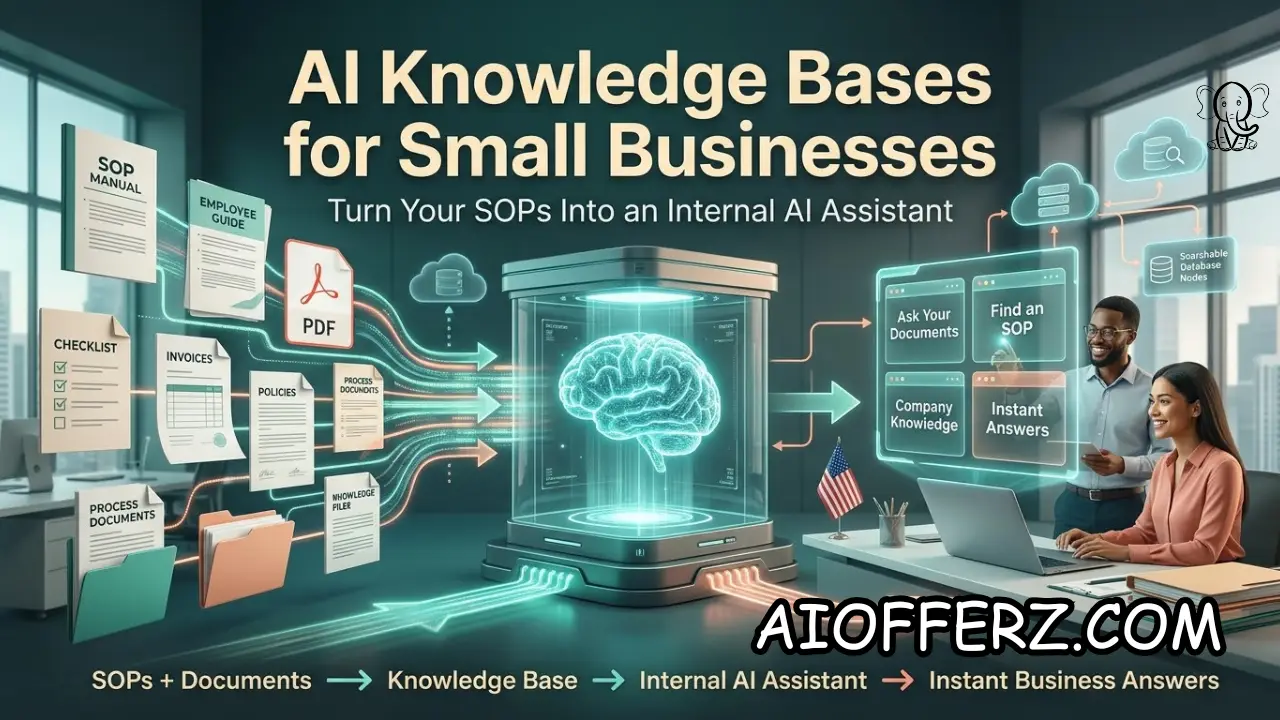
Why AI Knowledge Bases Are Becoming Essential for Small Businesses
Small businesses often have a surprising amount of valuable knowledge trapped inside documents, PDFs, shared folders, spreadsheets, emails, training manuals, SOPs, and the experience of long-time employees.
The problem is not usually a lack of information. The problem is finding the right information quickly when someone needs it.
An employee may know that a procedure exists but not remember where the document is stored. Another employee may ask a manager the same question that has already been answered in an internal handbook.
A new hire may spend hours learning processes that an experienced employee can explain in five minutes. These small inefficiencies become expensive when they happen repeatedly.
An internal AI assistant can provide a practical solution. Instead of asking employees to search through folders manually, a company can organize approved internal information and allow employees to ask questions in natural language.
The AI can retrieve relevant information and provide an answer based on the company’s own knowledge.
This technology is already moving into mainstream business software. OpenAI’s current Company Knowledge capability allows eligible ChatGPT Business, Enterprise.
And Edu users to connect supported company applications and receive organization-specific answers with citations back to source information.
Microsoft is taking a similar approach with SharePoint agents. SharePoint sites and document libraries can have AI-powered agents that answer questions based on content users already have permission to access.
Microsoft also allows organizations to create custom agents around selected sources and instructions.
For a small business, this means an internal AI assistant does not necessarily require building a complicated AI system from scratch.
The bigger challenge is preparing the company’s information properly, controlling access, and creating a reliable process for keeping the knowledge current.
The most valuable AI knowledge base is therefore not the one with the largest number of documents. It is the one containing accurate, organized, current information that employees can actually use.
Want To Use Other AI To Write…
What Documents and SOPs Should Go Into an AI Knowledge Base
The first step in creating an internal AI assistant is deciding what information the business actually wants employees to search. Not every company document needs to become part of the knowledge base.
Standard operating procedures are an excellent starting point. SOPs explain how recurring tasks should be completed, which makes them particularly useful for an AI assistant.
Examples include opening and closing procedures, customer onboarding, invoice processing, order handling, employee onboarding, support escalation, and quality-control processes.
Employee handbooks and internal policies can also be valuable. Employees may need quick answers about vacation procedures, expense policies, communication standards, equipment usage, security procedures, or workplace processes.
Sales and customer-service documentation is another useful category. An internal assistant can help employees locate product information, pricing rules, approved sales language, service policies, frequently asked questions, and escalation procedures.
Technical documentation can also be included where appropriate. Small businesses may have instructions for software configuration, troubleshooting, network procedures, account setup, or internal IT processes that are difficult for less experienced employees to find.
Meeting notes and historical documents require more caution. Old information can conflict with current procedures, so businesses should not simply upload everything they have accumulated over the years.
A knowledge base should distinguish current information from outdated information. Documents should have owners, dates, and clear status labels wherever practical.
Microsoft’s SharePoint agents demonstrate this source-based approach by allowing agents to work with selected sites, libraries, folders, and files while respecting the permissions already associated with those sources.
Google’s current Gemini Notebook Enterprise takes a similar approach by allowing teams to create curated collections of documents, websites, and other sources and then interact with those sources through a chat-based question-and-answer experience.
For small businesses, the lesson is straightforward: start with the documents employees use most frequently rather than trying to digitize the entire company archive.
How to Turn Existing Business Documents Into a Reliable AI Knowledge Base
Uploading documents to an AI platform is not the same thing as building a good knowledge base. If the source material is outdated, contradictory, poorly organized, or full of duplicate versions, the AI may struggle to determine which information should be trusted.
Start by creating a document inventory. List the major SOPs, policies, manuals, templates, FAQs, training documents, and other internal resources the company currently uses.
Next, identify duplicate documents. Small businesses frequently have multiple versions of the same procedure stored in different folders. One employee may use a document from last year while another uses a recently updated version.
Old information should be archived or clearly marked. If an AI assistant has access to contradictory documents, employees may receive inconsistent answers.
The business should also standardize important documents. A useful SOP should clearly state the process name, purpose, steps, responsible role, exceptions, and last-updated date.
Documents should be written for humans before they are optimized for AI. Clear headings, short sections, consistent terminology, and specific instructions make information easier for both employees and AI systems to retrieve.
The company should also assign an owner to important knowledge. Someone needs to be responsible for reviewing critical procedures when the business changes.
For example, if the company changes its refund policy, the old policy should not remain alongside the new policy without clear distinction. Otherwise, the AI may retrieve the wrong information.
Modern enterprise knowledge systems increasingly emphasize connecting AI to authoritative company sources rather than asking a general-purpose model to answer from memory.
OpenAI’s Company Knowledge, for example, can search connected business applications and return answers with source citations so users can verify the information.
Microsoft similarly allows SharePoint agents to use selected organizational content as knowledge sources and maintain the existing access permissions of those sources.
The objective should therefore be a controlled information system, not simply a large folder of files connected to an AI model.
Wanna Use CustomGPT AI…
How Employees Can Use an Internal AI Assistant Every Day
Once the knowledge base is organized, the next step is making it useful in everyday work. Employees should be able to ask practical questions instead of learning complicated commands or search syntax.
An employee might ask, “What is our process for handling a customer requesting a refund after 30 days?” The assistant should identify the relevant policy and explain the approved procedure.
A new employee might ask, “How do I create a new customer account?” Instead of searching through multiple folders, the employee can ask the internal assistant and receive the relevant process.
A customer-service representative could ask for the company’s approved response to a specific complaint. A sales representative could ask which discount rules apply to a particular customer category.
Managers can also use the knowledge base to locate policies, summarize procedures, or prepare training materials.
The assistant can become especially valuable during onboarding. New employees frequently ask the same basic questions during their first few weeks.
An internal AI assistant can provide immediate answers based on approved company information while allowing employees to escalate unclear situations to a manager.
Google’s Gemini Notebook Enterprise is designed around this type of curated knowledge interaction. Its notebooks can organize selected sources and provide chat-based answers confined to the information contained in the notebook.
Internal AI can also help experienced employees. Even employees who already know their jobs may waste time looking for a specific policy, template, historical instruction, or technical detail.
The important thing is to make the assistant part of an existing workflow. If employees have to open a completely separate system, manually upload files, or remember special instructions every time they need help, adoption will suffer.
Microsoft’s current SharePoint agents can be accessed from SharePoint sites, pages, document libraries, and Teams, making the assistant available closer to where employees already work.
The goal is not to make employees dependent on AI for every decision. The goal is to reduce the time spent searching for information that the company has already documented.
How Small Businesses Can Control Accuracy, Permissions and Sensitive Information
Accuracy is one of the biggest concerns when turning company documents into an AI knowledge base. An internal assistant should not confidently provide an answer when the source material is missing, outdated, or contradictory.
The business should instruct the AI to distinguish between documented information and uncertainty. When there is no reliable source, the assistant should say that it cannot verify the answer instead of inventing a procedure.
Source citations can also improve trust. When an employee can see which document supports an answer, they can verify the information instead of blindly accepting the response.
Permissions are equally important. Employees should not automatically gain access to confidential documents simply because an AI assistant can technically search them.
Microsoft’s SharePoint agents are designed around existing access permissions, meaning users can access source information through the agent only where they already have appropriate permissions.
OpenAI’s Company Knowledge also states that it respects existing permissions in connected company applications, allowing users to access only information they are already authorized to view.
This is particularly important for small businesses handling financial records, employee information, customer data, contracts, legal documents, or proprietary business information.
The company should decide which information can be included in the knowledge base and which information requires additional controls.
Access should also be reviewed when employees join, change roles, or leave the organization. AI access should follow the same basic security discipline as other business systems.
Another important rule is human judgment. An internal AI assistant can retrieve procedures, summarize information, and explain documented policies, but it should not automatically make high-impact decisions simply because the information is available.
For example, an AI assistant can explain a company’s hiring policy, but management may still need to make the actual employment decision.
A good internal AI assistant should therefore combine three things: reliable source material, controlled permissions, and clear boundaries around what AI is allowed to decide.
Using Many AI’s For Many Work, Solution Is Here…
How to Build AI Workflows Around an Internal Knowledge Base
An AI knowledge base becomes significantly more useful when it is connected to business workflows. Searching documents is only the beginning.
For example, an employee could ask the AI to explain a customer onboarding process and then receive the relevant checklist, required documents, and next steps.
A customer-service assistant could use the company’s policies to help employees respond to common customer questions. If the issue falls outside approved rules, the workflow could direct the employee to a manager.
A sales team could use internal knowledge to prepare proposals, identify approved product information, and locate relevant case studies.
An operations team could use the assistant to explain procedures and generate task checklists based on approved SOPs.
The business can gradually move from “ask the knowledge base” toward “use the knowledge base to complete work.” That is where the potential value becomes much greater.
Microsoft’s 2026 SharePoint developments reflect this direction. Microsoft describes Copilot in SharePoint as capable of using natural language to work with content and, in its preview capabilities, perform tasks involving sites, pages, lists, libraries, reports, and Office files.
OpenAI’s current company-knowledge architecture similarly combines search and retrieval from connected business applications, while supported apps can provide additional workflow capabilities.
Small businesses should still introduce automation gradually. A good first workflow might be answering internal policy questions.
The next could be generating checklists. Later, the business might allow AI to create drafts, prepare tickets, or initiate approved actions.
Every automated action should have an appropriate approval level.
The more authority an AI system receives, the more important testing, permissions, logging, and human oversight become.
The practical goal is not to create an autonomous company overnight. It is to progressively turn reliable internal knowledge into useful workflows that save employees time.
How to Launch an Internal AI Assistant and Measure Its Business Value
A small business does not need thousands of documents before it can start. A focused pilot with 20 to 50 high-value documents may be more useful than a poorly organized archive containing thousands of files.
Start with one department or one recurring business problem. Customer service, employee onboarding, sales support, operations, and internal IT are often good starting points because they contain many repetitive information requests.
Select the most authoritative documents for that workflow and remove obvious duplicates. Then create the initial AI assistant and test it with real questions employees commonly ask.
Testing should include easy questions, difficult questions, questions with missing information, questions involving conflicting documents, and questions the assistant should refuse to answer.
Employees should be encouraged to report incorrect or incomplete responses. Those reports can reveal problems with the source documents as well as problems with the AI configuration.
The business should measure practical outcomes. Useful metrics include time spent searching for information, employee questions sent to managers, onboarding time, support response time, repeated questions, and employee satisfaction.
The business can also measure how frequently the assistant successfully answers questions without human escalation.
Accuracy should remain more important than conversation volume. An assistant that answers 1,000 questions incorrectly is worse than one that accurately handles 200 important questions.
The knowledge base should also have a maintenance schedule. Important documents should be reviewed periodically, especially after changes to pricing, policies, software, compliance requirements, or operating procedures.
As the system becomes reliable, additional departments and workflows can be added.
The current direction of business AI supports this gradual approach. Companies are increasingly connecting AI systems to internal sources so that responses are grounded in organizational information rather than generic model knowledge.
OpenAI, Microsoft, and Google all now provide enterprise-oriented approaches for using company documents and connected sources with AI assistants.
For a small business, the real competitive advantage is not simply having an AI assistant. It is having an AI assistant that understands the company’s actual processes, uses trustworthy information, respects permissions, and improves employee productivity.
To get relief from Joint Pain , you can go for this.
FAQs
1. What is an AI knowledge base?
An AI knowledge base is a collection of company information that an AI assistant can search and use to answer questions based on approved internal sources.
2. Can I turn existing SOPs into an AI assistant?
Yes. Existing SOPs, manuals, policies, FAQs, and other documents can be organized as knowledge sources for an internal AI assistant.
3. Does a small business need to build its own AI model?
No. Most small businesses can use existing AI platforms and connect them to their own documents and business applications.
4. What documents should go into an AI knowledge base first?
Start with frequently used SOPs, employee policies, customer-service procedures, product information, onboarding materials, and internal FAQs.
5. Can employees ask an AI assistant questions about company policies?
Yes. When the relevant policies are included as reliable knowledge sources, employees can ask natural-language questions instead of manually searching documents.
6. Can an AI knowledge base prevent employees from seeing confidential information?
It can support permission-based access when the underlying platform respects source permissions. Microsoft SharePoint agents and OpenAI Company Knowledge, for example, are designed around existing access controls.
7. Can AI knowledge bases hallucinate?
Yes. AI can still produce incorrect answers, especially when source information is missing, ambiguous, or contradictory. Businesses should use authoritative documents, testing, citations, and escalation rules.
8. How often should a business update its AI knowledge base?
There is no universal schedule. Important documents should be updated whenever policies or processes change, with periodic reviews to identify outdated information.
9. Can an AI knowledge base help train new employees?
Yes. New employees can use it to ask questions about documented processes, policies, systems, and procedures, reducing the amount of repetitive explanation required from managers.
10. What is the best way to start an AI knowledge base?
Start small with one department and a limited collection of authoritative documents. Test real employee questions, fix information gaps, measure results, and expand gradually.
Ready to Begin?
➜ Click Here to explore top rated affiliate programs on ClickBank!
➜ Reach Our Free Offers: “Come Here To Earn Money By Your Mobile Easily in 2025.”
Want To Read More Then Click Here…
If You Are Interested In Health And Fitness Articles Then Click Here.
If You Are Interested In Indian Share Market Articles Then Click Here.
Thanks To Visit Our Website-We Will Wait For You Come Again Soon…