Why an AI Receptionist Is Becoming Useful for U.S. Small Businesses
For a small business, a phone call can be worth far more than the few minutes it takes to answer it. A new customer may be calling to book an appointment, request a quote, ask about availability, check business hours, or find out whether a particular service is offered.
If nobody answers, that opportunity can disappear before an employee even sees the missed-call notification.
This is where an AI receptionist for small businesses can become useful.
Instead of allowing every unanswered call to go directly to voicemail, an AI receptionist can answer routine calls, collect information, provide approved business details, schedule appointments, and transfer conversations that require a person.
The technology is especially relevant to businesses where employees are frequently away from the phone.
Contractors may be on job sites, dentists may be treating patients, auto repair employees may be working with customers, restaurants may be busy during service, and professional offices may have limited front-desk coverage.
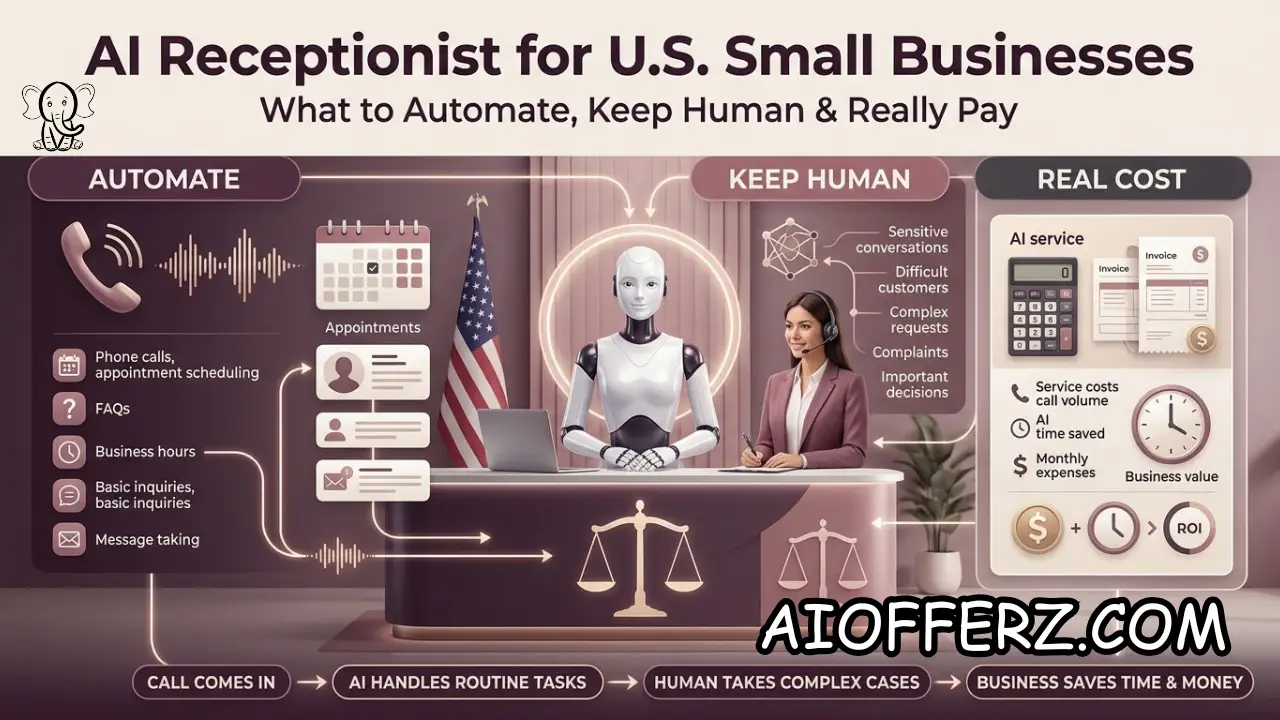
The goal should not be to eliminate the receptionist or make every customer talk to software. The better approach is to automate predictable conversations while keeping humans responsible for complicated, sensitive, or high-value interactions.
That distinction is important because a small business does not necessarily need another employee simply to answer repetitive questions.
At the same time, it should not hand every customer interaction to an automated system simply because AI is available.
A good AI receptionist sits between those two extremes. It provides coverage when employees are busy or unavailable while giving customers a clear path to a human whenever the situation requires one.
Want To Use Other AI To Write…
What an AI Receptionist Should Automate for a Small Business
The first job of an AI receptionist should be handling repetitive questions. Customers frequently ask for business hours, location information, services offered, appointment availability, basic pricing information, parking instructions, or other details that can be maintained in an approved knowledge base.
Appointment scheduling is another strong use case. An AI receptionist can ask what service the customer wants, collect the required information, check available appointment windows, and confirm a booking.
This can reduce the number of calls employees need to handle manually.
Lead capture can also be automated. When someone calls after seeing an advertisement, Google Business Profile, social media post, or website, the AI can collect the person’s name, phone number, reason for calling, and other information relevant to the business.
Missed-call recovery is particularly valuable. Instead of letting a missed call become a dead lead, the system can follow an approved process to contact the caller through an appropriate channel or create a callback task for an employee.
AI can also handle routine follow-ups. It can remind customers about appointments, follow up on inquiries, confirm information, or notify customers about approved updates.
The best automation targets tasks that are repetitive, predictable, and easy to verify. The more a task depends on judgment, negotiation, empathy, or specialized expertise, the more likely it should remain human-led.
What Small Businesses Should Keep Human
An AI receptionist should not be treated as an all-purpose employee. There are situations where customers need someone who can understand context, make a judgment, take responsibility, or simply listen.
Complaints are a good example. A customer who is angry about a charge, service problem, delay, or previous interaction may become more frustrated if the business forces them through an automated system.
AI can collect the basic information, but a human should be available to resolve the issue.
Complex sales conversations should also remain human-led. AI can qualify a lead and schedule a call, but a salesperson is generally better positioned to understand a customer’s unique needs, discuss alternatives, negotiate, and close a complicated deal.
Professional advice is another area requiring caution. A medical office, law firm, accounting firm, financial business, or other professional organization should not assume that an AI receptionist can replace the professional who provides the actual service.
Sensitive customer information also deserves careful handling. Businesses should know what information the AI system records, where it is stored, how long it is retained, who can access it, and whether the vendor uses customer information for other purposes.
The FTC advises businesses to protect sensitive customer information, collect only what is needed, keep it secure, and dispose of it appropriately.
The agency also warns that companies need to honor privacy commitments made to customers.
The practical rule is simple: let AI manage the front door, but do not force AI to become the entire business.
Wanna Use CustomGPT AI…
How AI Receptionists Handle Calls, Leads, Appointments and Follow-Ups
A useful AI receptionist starts with the incoming call. The system identifies the business, answers using an approved greeting, and asks the caller what they need.
From there, the conversation can follow different paths based on the customer’s request.
If the caller wants an appointment, the AI can collect the information required for scheduling.
Depending on the business, that might include the service requested, preferred date, location, customer name, contact information, and other operational details.
If the caller is a new lead, the system can capture the basic information and determine the appropriate next step. It might schedule a consultation, send a booking link, transfer the call, or create a callback request.
If the caller asks a routine question, the AI can provide the answer from the business’s approved information. This is where maintaining accurate business information becomes critical.
Incorrect hours, prices, policies, or availability can create customer frustration instead of reducing it.
If the request is outside the AI’s capabilities, the system should escalate. A good AI receptionist should know when it does not know something. It should not invent an answer simply to avoid transferring a call.
The conversation should also generate useful operational data. The business should be able to see which calls were answered, which callers booked, which calls required human assistance, and which inquiries did not convert.
That information makes AI measurable. Instead of asking whether the receptionist “sounds human,” the business can ask whether it answers more calls, produces more appointments, reduces response time, and saves employee hours.

How Much Does an AI Receptionist Really Cost in the U.S.?
There is no single standard price for an AI receptionist. Providers can charge through monthly subscriptions, usage-based pricing, per-minute charges, setup fees, message charges, or combinations of these models.
A business should therefore avoid comparing plans based only on the advertised monthly price.
A $50 monthly plan can become expensive if it includes very little usage, while a higher-priced plan may be cheaper for a business handling substantial call volume.
The main cost components are usually the AI software, telephone or voice usage, setup and customization, integrations, and additional usage. Some providers may bundle these costs while others separate them.
The number of calls matters, but so does call length. A business receiving 300 short calls has a different usage profile from one receiving 100 calls that last several minutes each.
Another factor is complexity. A basic AI receptionist that answers questions may be relatively simple.
A system that connects to calendars, CRM software, payment systems, appointment platforms, customer records, and other business tools can require more configuration.
Pricing from AI receptionist providers serving India illustrates how varied these models can be: published examples include per-minute pricing, monthly plans, setup charges, and pay-as-you-go structures.
These figures should not be treated as U.S. pricing, but they demonstrate why comparing “monthly price” alone can be misleading.
For a U.S. small business, the better calculation is cost per useful outcome. If the system costs $300 per month and helps recover enough appointments or leads to generate $2,000 in additional gross profit, the software may be economically attractive.
If it costs $300 and produces no measurable business improvement, the technology is not solving the right problem.
Using Many AI’s For Many Work, Solution Is Here…
How to Calculate Whether an AI Receptionist Is Worth the Money
The simplest way to calculate ROI is to start with missed calls. A business should examine its phone records and determine how many calls go unanswered during a typical month.
Suppose a business receives 600 calls and misses 120. If even a portion of those callers represent potential customers, the missed-call number provides a useful starting point for evaluating automation.
The next step is to determine how many missed callers normally become customers. Historical records may not provide a perfect answer, but even a reasonable estimate can make the calculation more useful.
For example, if 20 of those 120 missed calls would normally have become paying customers and the average gross profit from each customer is $150, the potential monthly gross profit associated with those missed opportunities would be $3,000.
An AI receptionist does not necessarily recover all of those customers. If it successfully recovers five, the business can compare the gross profit from those five customers against the monthly technology cost.
Employee time should also be included. If an AI system handles routine calls and frees an employee for five hours each week, that time has economic value even if the business does not reduce headcount.
The calculation should also include setup and integration costs. A system that requires a large one-time implementation expense may still make sense, but the business should spread that cost across a reasonable period when evaluating ROI.
The most important metric is therefore not the number of calls the AI answered. It is the number of valuable outcomes it created.
Businesses should monitor answered calls, booked appointments, qualified leads, transfers to humans, missed-call recovery, no-show rates, conversion rates, customer satisfaction, and total cost.
After 30 to 90 days, the owner should be able to determine whether the AI receptionist is producing enough measurable value to continue or expand.
How U.S. Small Businesses Should Handle Privacy, AI Disclosure and Call Compliance
Using an AI receptionist involves more than choosing a voice that sounds natural. The system may collect names, phone numbers, appointment details, customer questions, payment-related information, or other sensitive business data.
Businesses should understand exactly how their provider handles that information.
The FTC has emphasized that AI companies and businesses using AI must honor privacy and confidentiality commitments, particularly when customer data is processed through third-party AI services.
Businesses should also minimize the information the AI collects. If an AI receptionist only needs a name, phone number, and appointment request, there may be no reason to collect additional sensitive information.
Call recording deserves particular attention. State laws differ regarding recording and consent, so businesses should review applicable federal and state requirements before recording or storing conversations.
Outbound AI calls are another important issue. The FCC has confirmed that AI-generated voices fall within the Telephone Consumer Protection Act’s restrictions on artificial or prerecorded voice calls.
For certain calls, prior express consent is required, and telemarketing calls can have additional written-consent requirements.
This means an AI receptionist designed to answer inbound calls is not automatically equivalent to an AI system making unsolicited outbound marketing calls. Businesses should distinguish between those use cases.
Transparency can also improve the customer experience. Depending on the application and applicable requirements, businesses may choose to tell callers that they are interacting with an AI assistant and provide an easy way to reach a human.
Security should be evaluated before connecting the AI receptionist to customer databases. The FTC recommends businesses maintain reasonable safeguards for sensitive information and keep security practices appropriate to the data they hold.
For a small business, compliance should not be treated as something to investigate after implementation.
Privacy, recording, consent, security, data retention, and escalation policies should be part of the AI project from the beginning.
To get relief from Joint Pain , you can go for this.
How to Choose and Implement an AI Receptionist Without Wasting Money
The best AI receptionist is not necessarily the one with the most features. It is the one that solves the specific communication problem the business actually has.
Before buying anything, the owner should identify the calls that are currently consuming employee time. If most calls involve appointments, the system should be excellent at scheduling.
If most calls are lead inquiries, lead capture and follow-up may matter more.
Integration should be near the top of the evaluation list. An AI receptionist that operates separately from the business calendar, CRM, appointment system, or customer database may create additional administrative work.
The business should also test the AI using real-world scenarios. Ask common customer questions, unusual questions, cancellation questions, pricing questions, and requests to speak with a person.
The escalation process should be tested as carefully as the AI’s normal responses. The system should transfer calls correctly and provide enough context to the employee so the customer does not have to repeat everything.
A small pilot is usually better than a full-scale rollout. Start with one phone number, one location, or a limited set of call types.
Review call transcripts or summaries where legally and operationally appropriate, identify errors, and update the knowledge base.
The business should also establish a human fallback. If the AI fails, the call system or employee should still be able to receive important customer requests.
Finally, compare results before and after implementation. Measure missed calls, booked appointments, lead conversion, response time, employee workload, and customer feedback.
An AI receptionist should earn its place in the business through measurable performance. If it saves time but frustrates customers, it needs improvement.
If customers like it but it produces no useful outcomes, it may not justify the cost. It answers calls, books business, reduces repetitive work, and escalates complex issues appropriately, it can become a valuable part of the operation.
You can go for this to get natural Glowing Skin.
FAQs
1. What is an AI receptionist?
An AI receptionist is software that can answer business phone calls, communicate with customers, collect information, schedule appointments, answer approved questions, and transfer calls to human employees when necessary.
2. How much does an AI receptionist cost?
Pricing varies significantly. Providers may charge monthly subscriptions, per-minute usage, setup fees, or combinations of these. Businesses should compare total expected monthly cost rather than the advertised base price alone.
3. Can an AI receptionist replace a human receptionist?
It can automate many routine receptionist tasks, but businesses should generally keep humans available for complaints, complex questions, sensitive situations, professional advice, and high-value conversations.
4. Can AI receptionists book appointments?
Yes. When connected to an appropriate calendar or scheduling system, an AI receptionist can collect appointment information, check availability, schedule appointments, and send confirmations.
5. Can an AI receptionist answer calls after business hours?
Yes. One of the major advantages is providing consistent call coverage outside normal office hours, subject to the system’s configuration and escalation capabilities.
6. Can an AI receptionist make outbound calls?
Some systems can make outbound calls, but businesses need to consider applicable federal and state telephone rules. The FCC has confirmed that AI-generated voices are covered by TCPA restrictions applicable to artificial or prerecorded voice calls.
7. Is an AI receptionist good for a small business with only a few employees?
It can be particularly useful when employees frequently miss calls because they are serving customers, working in the field, or handling other tasks.
8. What information should an AI receptionist collect?
Only information necessary for the specific workflow should generally be collected. Depending on the business, this might include name, phone number, service requested, preferred appointment time, and basic customer details.
9. How do I know whether an AI receptionist is worth the cost?
Compare its total cost with measurable outcomes such as recovered missed calls, additional appointments, lead conversions, employee time saved, and revenue or gross profit generated.
10. What should remain human when using an AI receptionist?
Complex complaints, sensitive situations, professional advice, complicated sales conversations, negotiations, unusual requests, and situations requiring significant judgment should generally remain human-led.
Ready to Begin?
➜ Click Here to explore top rated affiliate programs on ClickBank!
➜ Reach Our Free Offers: “Come Here To Earn Money By Your Mobile Easily in 2026.”
Want To Read More Then Click Here…
If You Are Interested In Health And Fitness Articles Then Click Here.
If You Are Interested In Indian Share Market Articles Then Click Here.
Thanks To Visit Our Website-We Will Wait For You Come Again Soon…