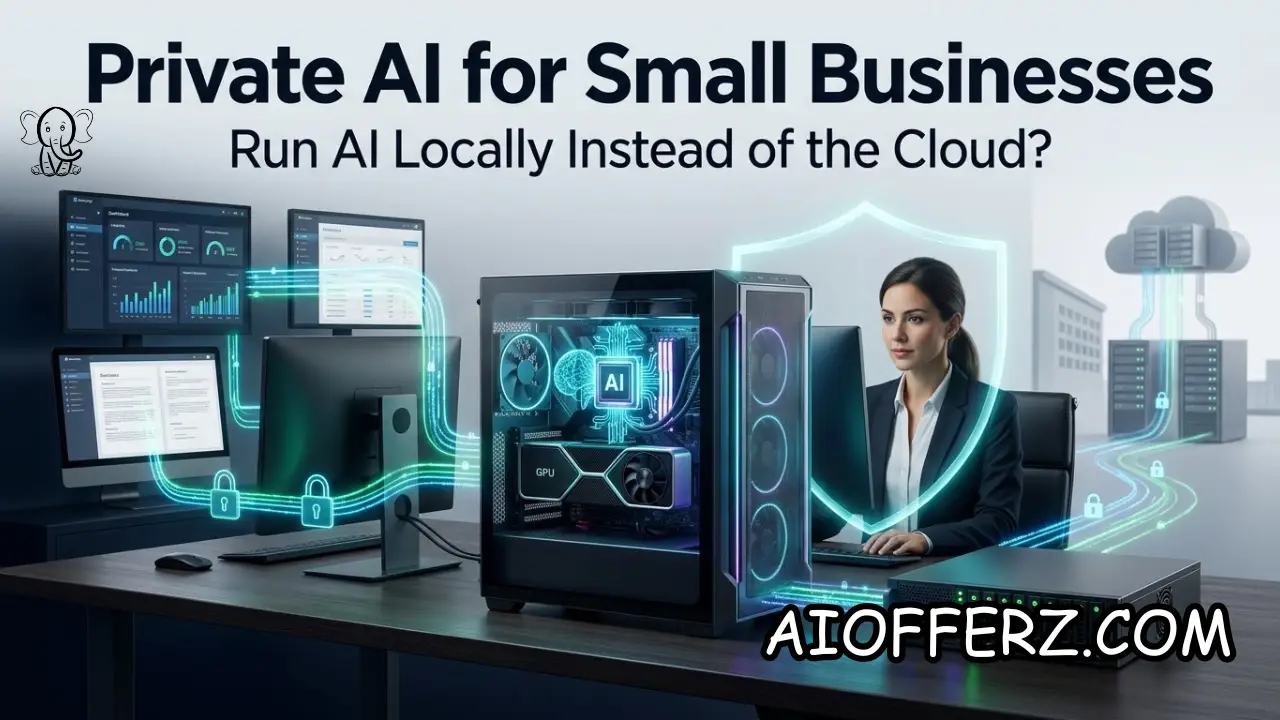
Private AI for Small Businesses: What Running an AI Model Locally Actually Means
Private AI is becoming a more realistic option for small businesses in 2026. Instead of sending every AI request to a cloud service, a company can run an open-weight AI model on its own computer, workstation, or private server.
The business controls the hardware, software environment, data access, and deployment.
This does not mean that every small business needs its own data center or expensive AI server. Modern smaller language models can run on increasingly accessible hardware, depending on the model size and workload.
The important question is whether the business has a genuine reason to keep AI processing under its own control.
Cloud AI remains the easiest option for most companies. A business can create an account, select a model, connect an application, and start using AI without purchasing GPUs or managing servers.
Cloud providers also make it easier to access the newest and most capable models without maintaining the underlying infrastructure.
Local AI changes that arrangement. The business takes more responsibility for the infrastructure but gains greater control over where data is processed.
Local AI systems can operate without sending prompts and documents to an external AI provider, although the exact privacy characteristics depend on the complete software and network configuration.
This distinction matters for businesses handling sensitive information.
Law firms, accounting practices, healthcare-related organizations, financial companies, contractors, manufacturers, and businesses with valuable proprietary documents may have stronger reasons to consider private AI.
The technology is also becoming more accessible. Tools such as Ollama allow businesses and developers to run open models locally, while its current documentation distinguishes local execution from its separate cloud offerings.
Ollama states that models running on a user’s own hardware can be used without the cloud usage limits that apply to its hosted services.
However, private AI should not be purchased simply because the word “private” sounds better.
A small business must compare privacy requirements, workload volume, hardware requirements, technical skills, model quality, maintenance, and total cost against the convenience of cloud AI.
The real decision is not “local AI versus cloud AI.” It is whether the additional control provided by local AI is valuable enough to justify the additional responsibility.
Want To Use Other AI To Write…
When Data Privacy Makes Local AI More Attractive for a U.S. Small Business
Privacy is one of the strongest reasons a small business may consider running an AI model locally. When an AI workflow involves confidential documents, customer records, proprietary processes, internal reports, or other sensitive information, the company may prefer keeping the processing environment under its own control.
Consider a small law firm. Employees may want an AI assistant that searches internal case documents, summarizes files, drafts internal notes, or retrieves information from a private knowledge base.
Sending sensitive documents to an external service may require additional contractual, security, and compliance review.
A similar situation can occur at an accounting firm. Tax documents, financial statements, payroll records, and business financial information can contain highly sensitive data.
A local AI system could potentially process some internal workloads without sending those documents to an external AI API.
Manufacturers can have a different reason for using private AI. Their valuable information may consist of engineering documents, operating procedures, machine manuals, product specifications, quality-control records, or proprietary manufacturing processes.
The same principle applies to businesses with valuable internal knowledge. A company may have years of SOPs, pricing information, customer-service procedures, internal troubleshooting guides, and product documentation.
Keeping an AI knowledge system inside the company’s controlled environment can reduce the number of external systems receiving that information.
However, local processing does not automatically guarantee security. A poorly configured local server can still be compromised.
Weak passwords, outdated software, excessive user permissions, exposed network ports, insecure backups, and unpatched operating systems can create serious vulnerabilities.
The business therefore needs to think about the complete security environment rather than simply saying, “The model is local, so our data is safe.”
Cloud providers can also offer sophisticated security controls, encryption, identity management, logging, access policies, and enterprise contracts.
For some small businesses, a reputable cloud provider may actually provide a stronger overall security posture than an unmanaged computer sitting in an office.
The right question is therefore whether the company can responsibly manage the local environment.
Private AI makes the most sense when data sensitivity is genuinely important and the company has the technical capability to secure and maintain the infrastructure.
When Local AI Can Be Cheaper Than Cloud AI and When It Cannot
Cost is another reason businesses investigate local AI, but this is where unrealistic claims are common.
Cloud AI usually has a straightforward pricing structure. A business may pay per user, per API call, per token, or according to a monthly subscription. There is no need to purchase the underlying GPU hardware.
Local AI replaces some recurring cloud expenses with upfront infrastructure costs. The business may need a workstation, GPU, memory, storage, networking equipment, backup systems, and technical support.
That means the correct comparison is total cost of ownership rather than monthly subscription price.
For example, a business might spend several thousand dollars on hardware and setup but then run a high-volume internal AI workflow locally.
If the system operates heavily for several years, the economics may eventually become attractive compared with paying usage-based cloud charges.
But a small business with only one or two employees making occasional AI requests may never recover the hardware investment.
A recent 2026 cost analysis of local AI systems estimated that small-business deployments can involve hundreds or thousands of dollars in hardware and setup costs, while emphasizing that local AI is not necessarily cheaper for light users.
Electricity also matters. A GPU-intensive system running continuously consumes power, and the business must account for that cost. Hardware depreciation, replacement, cooling, maintenance, backups, and technical labor also belong in the calculation.
Cloud pricing has its own economic advantages. A business can start small and increase usage only when demand increases. It does not need to purchase hardware based on a future workload that may never arrive.
Local AI becomes economically more interesting when usage is predictable and high enough to keep the hardware busy.
For example, a company processing thousands of internal documents or running frequent AI classification tasks may benefit from having dedicated local compute.
Another advantage is cost predictability. Once the hardware is purchased, the marginal cost of processing additional workloads can be relatively low, although electricity and maintenance still apply.
Therefore, businesses should create a three-year cost comparison that includes hardware, electricity, software, technical labor, maintenance, cloud subscriptions, API usage, and expected workload.
If local AI does not produce a meaningful financial advantage, privacy or control may still justify it. But businesses should be honest about why they are making the investment.
Wanna Use CustomGPT AI…
Which Small-Business Workloads Are Good Candidates for Local AI
Not every AI workload should run locally. The best candidates tend to be predictable, privacy-sensitive, and manageable in terms of model requirements.
Internal document search is one strong example. A company could create a private AI assistant that searches SOPs, manuals, policies, training documents, and internal guides.
The employee asks a question, the local system searches the company’s approved knowledge base, and the AI produces an answer based on those documents.
Another candidate is document classification. A business might receive thousands of invoices, purchase orders, contracts, forms, or internal documents and use a local model to classify or extract information.
Local AI can also be useful for summarizing private documents. A company may want employees to summarize meeting transcripts, internal reports, customer notes, or operational documents without sending the source material to a third-party AI service.
Software development is another potential use case. A small development company may want AI assistance with code completion, code explanation, documentation, testing, and internal repositories while keeping proprietary source code within its controlled environment.
Manufacturing businesses may use local AI for internal operational knowledge. Technicians could ask questions about machine procedures, maintenance manuals, troubleshooting instructions, and internal documentation.
Customer-service workloads can also be considered, although businesses need to be careful about latency, accuracy, and integration requirements.
A local model might handle basic internal support while a cloud model handles more demanding customer-facing interactions.
The best approach is often hybrid rather than completely local.
A company could keep sensitive document retrieval and internal analysis local while using cloud AI for tasks that benefit from stronger frontier-model capabilities.
This avoids turning local AI into an ideological decision.
The model should be selected based on the workload.
Recent research and industry reporting point toward increasing interest in smaller, task-specific models because they can reduce compute requirements and operating costs for high-volume workloads.
A small business therefore does not necessarily need the largest available model. If a smaller model can accurately perform the specific task, it may be the more sensible choice.

What Hardware and Technical Setup Does Private AI Require?
The hardware requirements depend heavily on the AI model and workload.
Small models can run on ordinary modern computers, particularly when they are quantized to reduce memory requirements. Larger models require substantially more RAM or GPU memory and may need dedicated hardware.
A business should not begin by buying the most expensive GPU available. Start with the model requirements and work backward.
For a lightweight internal assistant, a powerful desktop or workstation may be sufficient.
For higher-volume inference, the business may need a dedicated GPU server.
Memory is particularly important because AI models can require substantial amounts of RAM or VRAM. Storage is also relevant because model files can be large and businesses may need room for multiple models, documents, indexes, logs, and backups.
Software is another part of the infrastructure. A local AI deployment may involve an inference runtime, model files, a user interface, document-processing tools, vector databases, authentication, monitoring, and integrations.
This is where technical expertise becomes a major factor.
Cloud AI hides much of this complexity. The provider manages servers, GPUs, model deployment, scaling, updates, and infrastructure failures.
With private AI, the business becomes responsible for those functions.
A small company without technical staff should therefore consider whether it can maintain the system reliably.
Tools such as Ollama can make local model deployment substantially easier by providing a practical way to run and manage models on local hardware.
Its current documentation states that running models on a user’s own hardware is unlimited, while its cloud service has separate usage-based pricing.
But an easier deployment tool does not eliminate the need for security and maintenance.
The system still needs updates, access controls, backups, monitoring, and a plan for hardware failure.
Before deploying private AI, the business should identify who will maintain the system and what happens if the machine stops working.
A local AI system that becomes unavailable for three days because nobody knows how to repair it can cost more than the cloud service it replaced.
Using Many AI’s For Many Work, Solution Is Here…
Local AI vs Cloud AI: Which Approach Makes More Sense in 2026?
Cloud AI is usually the better choice when convenience, model capability, scalability, and minimal infrastructure management are the priorities.
A startup that wants to add AI to its website, CRM, sales workflow, or customer-support system can usually move faster with cloud services.
Cloud providers also make it easier to access newer models as they become available. The business does not need to purchase new hardware whenever model requirements change.
Local AI becomes more attractive when privacy, predictable high-volume workloads, offline capability, data control, or long-term infrastructure ownership matters more.
Offline capability can be particularly valuable for businesses operating in environments where internet access is unreliable or where data should not leave a controlled network.
There is also a strategic advantage to keeping control over the model environment. A company that builds its internal AI system around open-weight models may have more flexibility to change models without rebuilding the entire workflow.
But that flexibility comes with responsibility.
Model updates, performance testing, security patches, hardware failures, backups, and employee access all become the company’s responsibility.
Another important consideration is model quality.
A local model may be perfectly adequate for summarization, classification, document retrieval, extraction, or internal Q&A but may not match the strongest cloud models on difficult reasoning or specialized tasks.
That gap can change quickly as smaller open models improve. Current reporting indicates that smaller and open-weight models are becoming increasingly capable while requiring significantly less compute than frontier systems for many basic workloads.
The practical answer for many U.S. small businesses is therefore hybrid AI.
Keep sensitive, repetitive, high-volume workloads local when the economics and privacy requirements justify it.
Use cloud AI when a task requires stronger capabilities, rapid deployment, or elastic computing.
This approach allows the company to choose the right infrastructure for each workflow rather than forcing every AI task into one environment.
You can go for this to get natural Glowing Skin.
How a U.S. Small Business Should Decide Whether Private AI Is Worth It
The decision should begin with the business problem, not the hardware.
Write down exactly what the AI system is expected to accomplish. Then identify the data involved, workload volume, required response speed, accuracy requirements, security requirements, and expected financial value.
Next, compare local and cloud options using total cost of ownership.
For local AI, include hardware, electricity, software, maintenance, technical support, backups, upgrades, and employee time.
For cloud AI, include subscriptions, API usage, storage, integrations, data-transfer costs, and any other recurring charges.
Then evaluate privacy.
If the business handles highly confidential information and keeping that information inside its own infrastructure provides meaningful risk reduction or contractual advantages, local AI may have value beyond simple cost savings.
Next, test the model.
Do not assume that a local model will perform adequately because it looks impressive in a benchmark. Run representative examples from the actual business workflow.
Measure accuracy, response speed, failure rate, and human correction requirements.
A local model that is 20% cheaper but requires employees to correct twice as many answers may not actually save money.
The same principle applies in reverse. A cloud model that costs more per request may still be cheaper overall if it requires less maintenance and produces substantially better results.
A small business should also consider growth.
If the workload is expected to increase dramatically, the company should model whether local hardware can handle future demand.
Hybrid deployment may be the safest answer.
Private AI does not need to replace cloud AI. It can complement it.
For example, a company might run its private knowledge base locally while using a cloud model for selected tasks after sensitive information has been filtered or anonymized.
The final decision should therefore come down to measurable business value.
Private AI is worth considering when data control, privacy, predictable high-volume usage, offline capability, or infrastructure ownership provide enough value to justify the added hardware and management responsibility.
For a small business with light AI usage, cloud AI will usually remain simpler.
For a company with sensitive data and sustained workloads, private AI can become a strategically valuable part of its technology stack.
The goal is not to keep everything local.
The goal is to put each AI workload in the environment that gives the business the best combination of privacy, cost, performance, reliability, and control.
To get relief from Joint Pain , you can go for this.
FAQs
1. What is private AI for a small business?
Private AI generally means running an AI model within infrastructure controlled by the business rather than sending every AI request to a public cloud AI service.
2. Is local AI better than cloud AI?
Neither is universally better. Local AI offers greater control and can provide privacy and predictable economics for suitable workloads, while cloud AI usually provides easier deployment, scalability, and access to powerful models.
3. Is local AI cheaper than ChatGPT or other cloud AI tools?
Not necessarily. Local AI requires hardware, electricity, maintenance, and technical expertise. It can become economically attractive for high-volume workloads, but light users may find cloud AI cheaper.
4. Can a small business run an AI model on its own computer?
Yes. Smaller models can run on capable consumer computers, depending on model size, memory, and workload requirements. Larger models may require dedicated GPU hardware.
5. Does local AI mean my data is completely secure?
No. Local processing can reduce exposure to external AI services, but the local computer or server still needs strong authentication, access controls, patching, encryption, backups, and network security.
6. What businesses benefit most from private AI?
Businesses handling sensitive documents, proprietary information, confidential customer data, or high-volume AI workloads may have stronger reasons to consider private AI.
7. Can private AI work without an internet connection?
Yes, if the complete AI application, model, data, and required software are installed locally. Some integrations and external services will still require internet connectivity.
8. What is the biggest disadvantage of local AI?
The biggest disadvantage for many small businesses is operational responsibility. The company must manage hardware, software, security, updates, backups, performance, and failures.
9. Can a business use both local and cloud AI?
Yes. A hybrid approach can keep sensitive or high-volume workloads local while using cloud models for tasks that require greater reasoning capability or convenient scaling.
10. How should a small business decide whether to run AI locally?
Compare local and cloud options based on privacy requirements, workload volume, model performance, total cost of ownership, technical expertise, reliability, and expected business value.
Ready to Begin?
➜ Click Here to explore top rated affiliate programs on ClickBank!
➜ Reach Our Free Offers: “Come Here To Earn Money By Your Mobile Easily in 2025.”
Want To Read More Then Click Here…
If You Are Interested In Health And Fitness Articles Then Click Here.
If You Are Interested In Indian Share Market Articles Then Click Here.
Thanks To Visit Our Website-We Will Wait For You Come Again Soon…