Last year, I found myself staring at a massive bottleneck in my digital agency. We were manually mapping out client workflows, stitching APIs together with brittle code and spending weeks onboarding a single enterprise account.
The margins were shrinking and the delivery times were expanding. That was the exact moment I realized that building bespoke AI solutions from absolute scratch for every single client is a fast track to burnout.
Instead of chasing custom development, we spent a frantic 48 hours strip-mining our operational tech stack to assemble an isolated, rebrandable environment.
We built a white-label AI automation agency sandbox. Within 48 hours, we had a fully functioning infrastructure capable of demonstrating real-time AI workflows under our own brand.
Setting up this isolated testing environment allows you to demo, build and deploy automated systems without risking active client data or blowing past development budgets.
If you want to scale a business in the current enterprise market, you need a pre-configured sandbox environment that showcases value before a client ever signs a retainer. Here is the exact blueprint to build your operational sandbox in less than two days.
Want To Use Other AI To Write…
Phase 1: Architecture and Stack Selection (Hours 1–8)
The foundation of a high-performing AI automation agency sandbox relies entirely on infrastructure isolation. If your testing environment shares resources with your main agency applications, a single runaway recursive API call can crash your client-facing tools.
You need a modular, scalable architecture that mimics enterprise environments while remaining lightweight enough to manage with minimal overhead.
Choosing the Core Automation Engine
Your sandbox requires a central nervous system to handle data parsing, conditional logic and API routing. While many amateur builders default to basic consumers tools, professional enterprise automation requires platforms that support self-hosting or granular data-residency compliance.
-
n8n (Enterprise Choice): This is the gold standard for sandboxes because of its fair-code licensing model. You can self-host n8n on a virtual private server which completely eliminates per-execution costs. It gives you raw control over JavaScript and Python data manipulation within nodes, making it perfect for complex AI logic.
-
Make.com (Rapid Prototype Choice): If you are short on server administration skills, Make provides an incredibly visual interface. It allows for fast multi-step error handling and supports complex JSON structures natively. The downside is execution cost scaling, but for a 48-hour sandbox setup, its speed is unmatched.
Integrating the Large Language Model Layer
Do not hook your sandbox directly to raw, unmonitored upstream model APIs. You need an orchestration layer that allows you to swap models instantly based on cost, latency and performance characteristics.
Using a tool like OpenWebUI, AnythingLLM, or Vercel AI SDK as your middleware ensures you can present a branded chat or agentic interface to prospective clients.
This layer acts as the primary user interface where users interact with your custom-tuned prompts, vector databases and agent workflows.
Wanna Use CustomGPT AI…
Vector Databases and Memory Management
An AI agent without context is completely useless to a corporate client. Your sandbox needs a way to ingest enterprise data like PDFs, employee handbooks and CSV spreadsheets.
For the sandbox layer, opt for a vector database that requires zero maintenance. Pinecone offers a robust cloud-based free tier that handles millions of vectors with low latency.
If you prefer a completely self-contained local stack within your sandbox, deploy Qdrant or Milvus via Docker containers. This keeps all client demo data completely localized and hidden from third-party data harvesters.
Phase 2: Domain Infrastructure and White-Label Masking (Hours 9–16)
To sell enterprise automation, your technology must look like it belongs exclusively to your firm. Masking third-party applications behind custom domains, reverse proxies and tailored cascading style sheets transforms generic software into proprietary intellectual property.
DNS Configuration and Subdomain Strategy
Your primary agency website should remain completely untouched during this build. Choose a clean, technical subdomain schema dedicated entirely to the sandbox environment.
| Application | Recommended Subdomain Structure | Target Audience View |
| Workflow Automation | engine.youragency.com |
Internal Builder Environment |
| AI Agent Interface | portal.youragency.com | Client Demo Dashboard |
| API Webhook Gateway | api.youragency.com | Enterprise Integration Endpoint |
| Vector Management | data.youragency.com | Knowledge Base Controls |
Configure your DNS records using a managed provider like Cloudflare. Turn on the proxy status to ensure all underlying server IP addresses are masked, providing automatic DDoS protection and global SSL termination without manual server certificates.
Setting Up the Reverse Proxy
If you are hosting multiple applications on a single virtual private server to keep sandbox costs low, a reverse proxy is non-negotiable. Nginx Proxy Manager offers a clean graphic interface to route incoming web traffic smoothly.
Point your subdomains to your single server IP address. Inside Nginx Proxy Manager, route traffic from portal.youragency.com directly to the internal port of your AI interface container.
Activate Let’s Encrypt SSL certificates with automatic renewal. This step ensures that clients never see raw ports like :8080 or :5678 in their browser address bar, maintaining a pristine corporate image.
Using Many AI’s For Many Work, Solution Is Here…
CSS Injection and Brand Alignment
Most modern open-source AI tools support custom theme customization through custom stylesheets. Access the settings panel of your AI portal interface and inject global styles that override default colors.
Replace stock branding assets with high-resolution transparent vector graphics. Swap out standard neon greens or purples for corporate monochromatic tones, midnight blues or deep charcoals.
Ensure all button states, typography alignments and loading animations reflect a premium enterprise application.
Phase 3: Building Core Automation Frameworks (Hours 17–28)
With the infrastructure masked, you must now build the actual automation templates that form the backbone of your agency offerings. These are not basic text generators; they are resilient, multi-step data pipelines.
The Lead Ingestion and Enrichment Framework
This workflow proves to clients that your agency understands operational efficiency. It monitors an external inbound source, processes data through an AI engine and updates internal records automatically.
[Inbound Webhook] ➔ [Data Normalization Node] ➔ [AI Enrichment Agent] ➔ [CRM Injection]
-
Webhook Trigger: The sandbox listens for an incoming payload containing a name, email and company name.
-
Scraping Node: An HTTP request node hits public search APIs to retrieve company descriptions, funding history and employee headcount.
-
The LLM Processing Block: The structured data passes into an LLM node with a specific system prompt: “Analyze this company data. Identify their top two operational bottlenecks and output a concise summary in clean markdown.”
-
CRM Update: The enriched payload routes directly into an internal base or CRM like Airtable, alerting your sales team with a pre-written pitch.
If you want to stay healthy and fit, also loss your weight naturally then use it.
Autonomous Customer Support and Knowledge Retrieval
The second core framework is a Retrieval-Augmented Generation pipeline. This system connects your white-labeled chat interface directly to your vector database.
When a user types a query into the portal, the sandbox engine converts that text into an embedding vector using a model like text-embedding-3-small.
The system queries the vector database for the most mathematically relevant data fragments. It grabs those exact paragraphs and passes them alongside the user’s original query into the primary LLM.
The result is an answer grounded completely in corporate facts, totally eliminating AI hallucinations.
“Live Chat Jobs – You have to try this one”
Phase 4: API Gateway Security and Cost Controls (Hours 29–36)
An unmonitored sandbox is a massive financial liability. If a client or a malicious bot loops an agentic workflow repeatedly, you could easily wake up to a multi-thousand-dollar API bill. Security and rate-limiting must be baked directly into the system.
Implementing Global Rate Limiting
Configure rate limits directly inside Cloudflare or your Nginx configuration files. For client demo credentials, restrict API endpoints to a maximum of 15 requests per minute per IP address.
This step completely prevents automated script attacks from draining your system resources while still leaving plenty of room for natural human interaction during live presentations.
Budget Caps at the Model Provider Level
Log into your upstream accounts like OpenAI, Anthropic or OpenRouter. Set hard monthly spend limits.
Pro Tip: Set a soft alert at $50 and a hard shutoff cap at $100 for your sandbox environment. If the sandbox hits the hard cap, the APIs will instantly refuse calls rather than allowing unmetered overages to accumulate on your credit card.
Token Optimization and Context Window Guardrails
Amateur agency owners often pass massive blocks of messy data through expensive frontier models. To keep sandbox operations completely sustainable, implement strict truncation steps.
Before passing raw text to an LLM node, use a code block to measure string length or token counts. Strip away useless boilerplate code, email footers and HTML tags.
Use cheaper models like Claude 3.5 Haiku or GPT-4o-mini for initial data classification and processing. Reserve heavy models like Claude 3.5 Sonnet exclusively for final syntheses and client-facing text outputs.
You can use it naturally as an effective Dental Care tool.
Phase 5: Demo Data Seeding and Testing (Hours 37–44)
Your sandbox is now built and secured, but an empty system looks broken to a prospective client. You must populate the environment with realistic, high-fidelity synthetic business data that showcases your automation capabilities instantly.
Generating Synthetic Enterprise Files
Create three distinct sets of demo data:
-
A messy customer service log with mixed customer sentiment.
-
An unstructured corporate operations handbook filled with procedural guidelines.
-
A sales spreadsheet tracking pipeline deals with missing form fields.
Run these files through your ingestion pipelines. Verify that your vector database chunks the documents properly and indexes them cleanly.
This ensures that when you run a live presentation, your systems can instantly recall accurate answers from these specific files.
End-to-End Stress Testing
Spend at least four hours trying to break your own system. Send broken JSON payloads to your webhooks to ensure your error-handling paths catch the mistake gracefully without crashing the server.
Run concurrent chat sessions from multiple devices to confirm that the reverse proxy balances user traffic smoothly. Monitor server memory logs using terminal commands like htop to verify that your Docker containers are not leaking system memory.
Phase 6: The Live Client Demo Protocol (Hours 45–48)
The final hours of the sprint are dedicated to preparing the environment for commercial validation. You need an automated onboarding process to get prospective clients into the sandbox safely during a sales presentation.
Powerful brain supplement that protects you from mental exhaustion.
The Instant Value Strategy
When a prospect jumps onto a discovery call, do not simply talk over a slide deck. Send them a custom link to your white-labeled portal.
Have them paste a link to their own website or upload a sample PDF of their product catalog directly into your dashboard. Because you built an optimized, real-time ingestion pipeline, your sandbox will process their data right in front of their eyes.
Within two minutes, the custom-built agent will begin answering deep operational questions based entirely on their specific business model.
This immediate display of capability shifts the dynamic from a standard sales pitch to an interactive software experience. It completely eliminates the skepticism surrounding AI capabilities, proving that your agency has a fully functional infrastructure ready to deploy immediately.
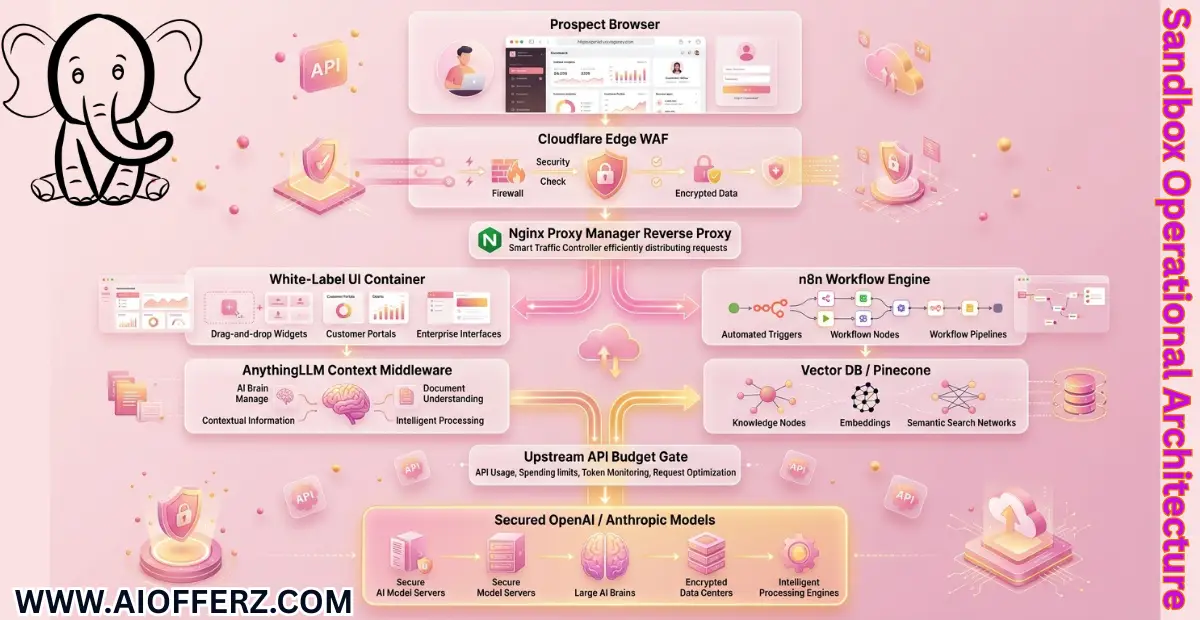
Sandbox Operational Architecture
The layout below represents how data securely routes through your white-labeled sandbox infrastructure without exposing internal networks or generating unexpected software costs.
FAQs
1. What is the total software cost to maintain this sandbox every month?
If you host your core workflow systems like n8n and OpenWebUI on a single virtual private cloud server through a provider like DigitalOcean, Linode or Hetzner, your fixed server cost ranges from $10 to $20 per month.
By pairing this with the free tiers of Cloudflare and Pinecone, your only remaining variable cost is your actual API usage which typically stays under $15 per month for normal sales demos.
2. Why should I choose self-hosted tools over visual builders like Zapier?
Zapier charges users per task execution, which quickly becomes incredibly expensive when running multi-step AI pipelines that handle thousands of data vectors.
Self-hosting tools like n8n inside an isolated sandbox eliminates task-based fees completely, giving you unlimited freedom to test complex recursive workflows without worrying about unexpected operational bills.
3. How do I protect sensitive prospect data uploaded during a sandbox presentation?
Set up an automatic maintenance script within your sandbox database. Configure a workflow that runs every single night at midnight to wipe out uploaded data assets, clear vector indexes and reset the chat logs.
Explicitly inform prospects that the sandbox is a temporary testing zone, which keeps your environment lightweight and helps maintain solid data hygiene.
4. Is a single virtual private server powerful enough to run an entire agency sandbox?
Yes, a basic server configured with 2 CPU cores and 4 gigabytes of random access memory can easily manage your reverse proxy, automation engine and frontend user interfaces simultaneously.
This is because the heavy computational work like model processing and vector math happens on external infrastructure owned by your API providers.
5. Can I use open-source local models directly on the sandbox server to completely eliminate API fees?
Running local open-source models like Llama 3 or Mistral directly on your server requires expensive graphics processing units that quickly break the budget of a lean sandbox setup.
Sticking with lightweight cloud APIs allows you to run your environment on cheap infrastructure while ensuring your clients experience blistering fast response speeds during live pitches.
6. What should I do if a client asks to buy the sandbox infrastructure directly from me?
This is a fantastic problem to encounter because it represents a clean transition into a enterprise software implementation contract.
Charge an upfront deployment fee to replicate your entire sandbox configuration directly inside their corporate cloud environment, then pivot them onto a recurring monthly retainer to manage and optimize the system.
7. How do I handle system errors elegantly when an upstream API goes down during a demo?
Always build conditional error paths directly into your critical automation sequences. If a primary API call fails, configure the system to route data to an alternate model provider automatically while displaying a smooth loading message to the client, ensuring your live demonstration never freezes on a broken screen.
8. Do I need advanced software development skills to manage this ecosystem?
You do not need to be an expert software engineer to operate this stack effectively. Modern tools rely heavily on visual node layouts and basic configuration files, meaning a solid understanding of webhooks, JSON structures and API documentation is all it takes to maintain your white-label sandbox.
9. How can I easily verify that my custom styling elements look professional across different devices?
Utilize the responsive layout testing tools built directly into modern web browsers to check how your interfaces render on various screens.
Keep your custom stylesheet designs clean and minimalist, avoiding overly complex layouts that can easily break on mobile phones or small tablet viewports.
10. Can I connect multiple distinct frontends to a single background automation engine?
Yes, a central automation framework can process data from diverse sources simultaneously. You can easily route incoming leads from your main public website, an interactive client portal and specialized landing pages into the exact same processing engine by assigning unique identifier tracking tags to each data path.
Ready to Begin?
➜ Click Here to explore top rated affiliate programs on ClickBank!
➜ Reach Our Free Offers: “Come Here To Earn Money By Your Mobile Easily in 2025.”
Want To Read More Then Click Here…
If You Are Interested In Health And Fitness Articles Then Click Here.
If You Are Interested In Indian Share Market Articles Then Click Here.
Thanks To Visit Our Website-We Will Wait For You Come Again Soon…